How Unisium Works: A Complete Study System for Math & Physics
Learn math and physics well enough to solve complex problems on your own. Unisium is a complete study system for students preparing for exams and independent learners building lasting understanding. Prepared material, four primary learning processes, feedback, and adaptive practice give you a study routine in one place.
You connect ideas, retrieve principles from memory, explain worked solutions, and solve problems yourself. The Unisium Study System supplies the material and organizes practice, so you do not need to build your own question bank, flashcard deck, or study system. You spend less time planning and more time doing the thinking that builds understanding and skill.
Created by Vegard Gjerde, drawing on ten years of research into university students’ learning strategies and exam preparation. His university mechanics teaching and physics-education research inform the Masterful Learning framework behind the system.
Check availability for a 14-day free trial. A payment method is required; billing begins after the trial unless you cancel.
Current subjects
Part of a growing math and physics catalog.
Mathematics
-
Algebra
Expressions and equations
-
Functions
Graphs and transformations
-
Calculus
Limits, derivatives, integrals
-
Differential equations
Equations involving rates of change
Physics
-
Classical mechanics
Motion, forces, and energy
-
Electromagnetism
Electric and magnetic fields
We're expanding Unisium's subject catalog, guided by what learners want to study next. Have a course or subject in mind? Tell us what you'd like to study.
The principle and subdomain guides are free. The subscription turns the material into an ongoing study system: questions to answer, worked solutions to explain, problems to solve, feedback, scheduled review, and a record of your progress.
Quick path: watch the example below, check whether your subject is covered, and see plans. For the detail: Start a session | Four learning processes | Adaptive practice | Progress | Collection and resources | Input options | FAQ
See What Studying Looks Like
Notice what the question tests: not just whether you remember the equation, but whether you know when it applies. This kinematics example shows a question, a committed answer, and feedback that identifies a way to improve the explanation.
Before watching: Vegard uses Wispr Flow, an external dictation tool, to speak into the app’s text fields. You can type instead. Audio or captions explain the pauses while he thinks or dictates. These September 2026 recordings show desktop study, including portrait edits; the workspace layout has since changed.
You can inspect the interaction without playing the video:
- Question: what condition must hold for this principle to apply, and what does it rule out?
- Attempt: Vegard identifies constant acceleration and explains that changing acceleration calls for the integral form.
- Feedback: the app recognizes the correct condition and asks him to make its scope explicit: it must hold throughout the interval.
That is elaborative encoding, one of four complementary processes. The full explanations and other examples below show how recall, worked-solution reasoning, and independent problem solving develop the other abilities.
Choose a plan when trials are available, learn the methods in the Guided First Session, then select your subject in Study setup.
Choose What to Study, Then Make an Attempt
Unisium organizes each subject around named principles, such as Newton’s second law or additive equality. A principle includes its meaning, equation, conditions for use, and connections to other ideas. This gives you a map of the knowledge behind problems, rather than a pile of exercises with no clear relationship.
Choose your subjects and learning modes in Study setup, then open the Focus tab in the subject’s principle view to narrow what you want to work on. Unisium selects practice within that scope and brings back work that is due for review. A study card is one activity in the session: a question about a principle, a retrieval attempt, a worked solution to explain, or a problem to solve.
Your first guided session introduces the four modes. After that, normal sessions combine new work and review according to your selected scope and progress. There is no fixed set of cards you have to finish. Study for as long as you like, then select End Session whenever you want to stop; your completed work is saved.
The recurring pattern is attempt, receive feedback, improve your understanding, and return later. When an idea is new, you can make a reasoned guess before checking an explanation. That makes study interactive: you test your own account of what is happening instead of only following someone else’s answer.
Four Learning Processes, Four Different Jobs
Understanding an equation, recalling it, explaining its use, and solving a new problem are related abilities, but they are not interchangeable. The four processes develop these abilities together, from connected knowledge to retrievable solution rules and practiced skill.
- Connect: build meaning and know when a principle applies.
- Retrieve: have the principle available without looking it up.
- Explain: learn why a worked model reaches its goal, so you can adapt that reasoning.
- Solve: choose and use principles independently to reach an answer.
You do not have to watch every clip to start. Explore the learning process that interests you; each recording demonstrates a different activity.
Elaborative encoding: make the principle meaningful
Elaborative encoding builds connections between a new idea and what you already know. You answer questions about what an equation means, when it applies, how it differs from another principle, or what an example would look like. These connections help you recognize an appropriate principle when a problem does not name it for you.
For example, knowing a constant-acceleration equation is different from knowing why it would not describe motion with changing acceleration. Unisium asks you to express that distinction in your own words. You can type an explanation, include equations, or dictate into the editor.
After you commit your answer, AI evaluates it and gives feedback about your understanding. Read what was missing or mistaken, then use the principle guide when you need a fuller explanation.
The kinematics demonstration above shows this process in use. For the learning rationale in more depth, read the elaborative encoding guide.
Retrieval practice: have the idea available from memory
Retrieval practice strengthens your ability to produce a principle without the reference in front of you. That matters because recognizing an equation on a page is not the same as recalling it when you need to build a model. Later reviews help keep that knowledge available beyond the session in which you first learned it.
In equation retrieval, you can describe the equation in words and let AI represent your description as an equation, or enter it directly in LaTeX. Describing it also gives you practice verbalizing the quantities and relationships, rather than reproducing symbols without their meaning. You inspect what was constructed, submit your attempt for scoring, and then see the reference.
You can instead sketch or handwrite your recall in the scratchpad, then reveal the answer and self-report whether you retrieved it. The input options below explain that choice and its collection eligibility.
Self-explanation: understand how a model reaches the goal
Self-explanation turns a worked solution into reasoning you can reuse. Instead of only reading the equations, you explain why these principles apply, how they are set up for this situation, and how the model connects the given information to the quantity being sought. You also explain what the mathematical steps accomplish.
For example, an explanation of an energy model should identify the relevant initial and final states, why energy conservation is appropriate, and how that relationship helps determine the unknown. Saying “they substituted the numbers” describes an action but leaves out the reasoning that would help you choose that action next time.
Write or dictate your explanation in the editor. The sketchpad can help you draw the situation and think through the model, while AI evaluates the submitted written explanation. The sketch itself is not AI-assessed, so put the reasoning you want evaluated into words or equations in your answer.
In this recording, Vegard explains a lift-car solution, submits his reasoning, and reads feedback asking him to state and justify the model equation more explicitly. It shows an attempt and its feedback, rather than an ideal answer to copy.
Problem solving: reach the answer yourself
Problem solving develops independent skill through choosing a model, carrying out the mathematics, and checking the result. It is where you practice doing the work that an exam problem asks of you, rather than explaining a solution that is already available.
The workspace supports the Five-Step Strategy:
- Verbal decoding: identify the target, given information, and constraints.
- Visual decoding: sketch the situation and choose useful axes or representations.
- Model: choose the relevant principles and set up their equations for the problem.
- Mathematical procedures: work from the model to the answer.
- Reflection: check the result and explain what you learned from the attempt.
You can build a structured solution in the app, describing your equations in words for AI to represent or writing them in LaTeX yourself. The sketchpad supports drawing and handwritten work. You can also solve on paper at your desk and enter your final answer in the app.
AI equation construction represents the mathematics you supply; it does not choose the model or solve the problem for you. For supported numerical expressions, Calculate can evaluate an expression you have set up. You still decide what to calculate and submit the final answer yourself.
First, Unisium evaluates whether your final answer is correct. Afterward, you can inspect the structured solution, compare its model and procedure with your own, and self-explain it if you want to understand the approach more deeply. Final-answer checking is separate from AI evaluation of an explanation.
This recording shows a braking-train problem: identifying the given information, sketching, building an equation from a spoken description, calculating, and checking the final answer. The workspace layout has since changed; the clip is a worked study session, not a tour of every current control.
Muadh described his own algebra practice:
The problem-solving card helped me practice and notice steps like the distributive property, additive equality, and how different ideas connect.
Start with the subject you want to strengthen. Your subscription includes the other currently available subjects too.
Practice That Adjusts as You Learn
Unisium learns from the attempts you make. When you perform well, you can move into more difficult work faster; when a level remains difficult, the system keeps practice closer to what you need to strengthen. Someone rebuilding foundations and someone already familiar with a subject can therefore progress at different rates through the same material.
Spacing brings principles back after an interval, so older knowledge continues to receive practice. Interleaving mixes principles and learning modes within your chosen scope, giving you practice recognizing the relevant idea instead of always using the one from the preceding example. Review due now is prioritized alongside progression into new work.
Attempting before seeing an explanation also provides a pretesting opportunity: you generate a candidate answer, then use feedback to improve it. Later retrieval and problem solving test whether you can still produce and use the idea. You do not have to arrange separate worksheets to make generation, feedback, and retesting part of your routine.
AI evaluation provides feedback on elaborative encoding and self-explanation. Equation retrieval has its own scoring, while problem solving checks the final answer before revealing the worked solution.
If feedback seems wrong, you can report it. The FAQ explains reporting and evaluation overrides.
See Both the Depth and Breadth of Your Progress
At the end of a session, the summary shows what your work changed: where you started building evidence, strengthened an existing score, or reached a higher level. It also records the learning modes you practiced and your resources and collection rewards. You can distinguish what changed in that session from your current standing.
Read your progress in two directions. Breadth is the range of principles you have worked on; depth is how far you have developed each one across Connect, Retrieve, Explain, and Solve. Four separate scores let you see, for example, that your recall is ahead of your independent problem solving, so knowing an equation does not stand in for being able to use it.
The Current progress graph brings those scores together for each subdomain in the Domain Explorer and in session summaries. The horizontal axis shows different principles, not passing time, in progression order. Height shows the level reached in each learning process. In the app, hover, tap, or select a principle to inspect its scores. Retrieve shows estimated memory strength, while unassessed scores stay blank until there is evidence to plot.
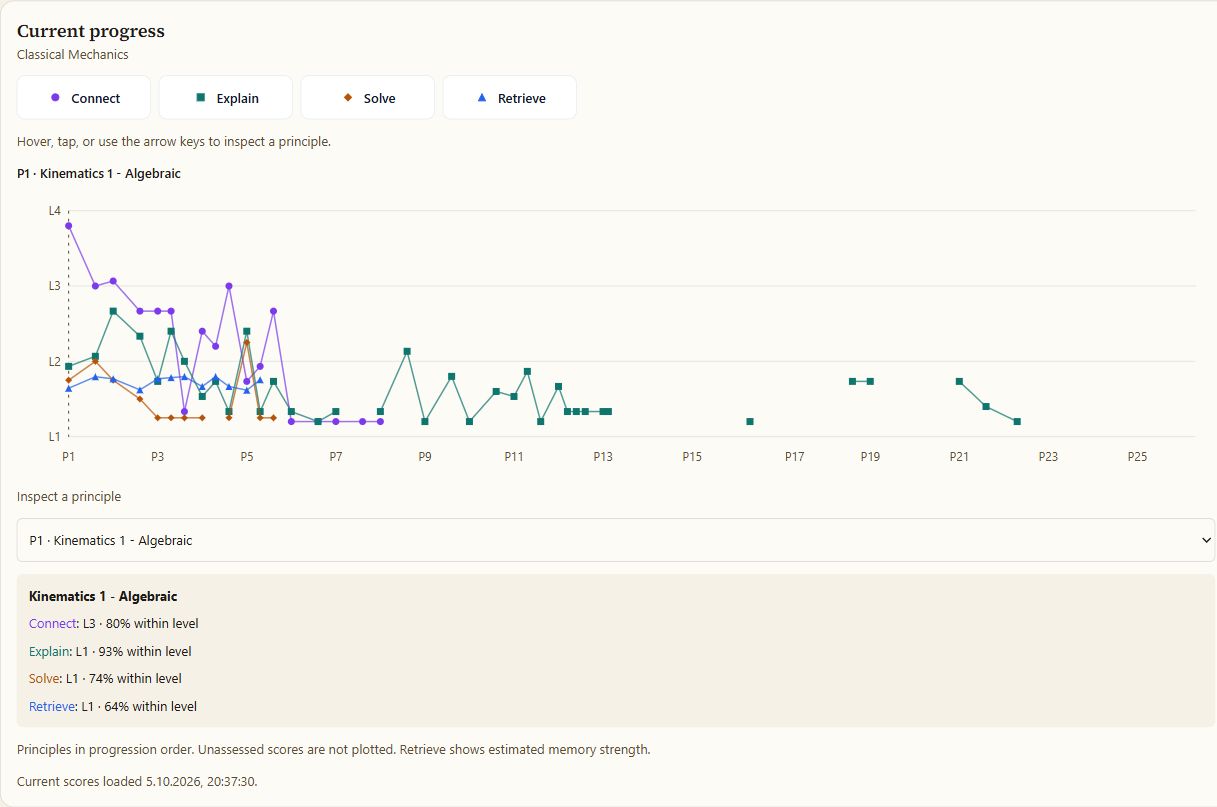
Read the selected principle: in this founder-account example, Connect is at Level 3, while Explain, Solve, and Retrieve are at Level 1. Understanding a principle does not automatically mean you can recall it or solve problems with it. Unisium tracks these abilities separately, so one strength does not hide the others.
In a session summary, highlights show which principles and learning processes that session contributed to. The graph keeps your current standing visible alongside those changes, so you can see how one session fits into your wider progress.
Levels give this development a common scale. The current material includes Level 4 practice, designed to match university exam difficulty.
Your first session can already show which kind of work feels difficult. Repeated sessions make the progress picture more useful: you see whether principles remain retrievable and whether you can apply them across different problems.
Build a Scientist Collection as You Study
Eligible study can lead to discoveries of scientist collection cards associated with the principles and subject areas you work on. Studying mechanics can connect you with figures such as Galileo and Newton; algebra connects with figures such as al-Khwārizmī. Open your Collection to browse the cards you have found and inspect a card more closely.
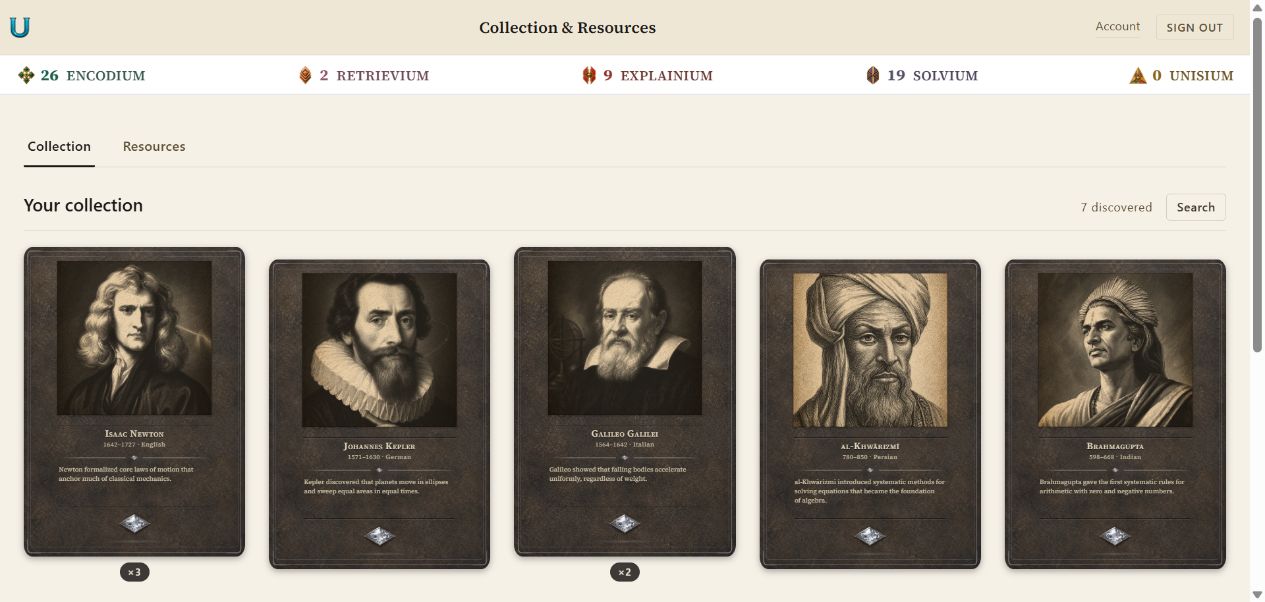
Cards have level-based variants. More demanding eligible work can make higher-level cards available, with both the difficulty of the activity and genuine active study time contributing to eligibility. Discovery still involves chance, and repeated finds can add copies of a card you already own.
The Galileo and Newton reveals in the study clips show the discovery moment. Your collection then keeps those finds available to browse afterward. The purpose is to make continued study more engaging while keeping the learning processes at the center.
How card levels and eligibility work
Difficulty and accepted active study time contribute to collection eligibility. The activity still needs to meet its collection rules; time alone does not guarantee a discovery. Self-reported scratchpad retrieval does not qualify for collection-card drops.
The collection is being developed further with rarity classes alongside its level-based structure. Levels and eligibility already shape discoveries; rarity classes are a planned extension, not a control shown in the current screenshots.
Your recent study effort counts
Returning regularly builds persistence, and missing a day does not wipe it out. Your score combines recent study, regular returns, and the duration of your completed activities. It gives your study routine continuity alongside your growing scientist collection.
The Study rhythm graph in Study setup shows the last four weeks: study added, gradual decay, and the resulting score. You can also inspect persistence in Collection & Resources and see your session’s contribution in its summary. Learning levels describe your knowledge and skill; persistence records the study habit behind that work.
How persistence grows and improves collection chances
Longer active study adds more, with smaller gains for each extra minute within a day. Older effort gradually fades, with half its value remaining after seven days. Returning regularly helps you build and maintain the score. The graph uses blue bars for study added, amber bars for decay, and a line for the resulting score.
Persistence increases your ordinary chance of finding an eligible collection card. Each point adds 1% of that ordinary chance: a score of 20 turns a 10% chance into 12%, before other boosts. It does not change card levels or resource earnings.
Accepted active time from completed cards counts, including unsuccessful attempts, so effort still contributes when an answer needs more work. Tutorial, skipped, and abandoned cards do not count.
Earn resources from completed study
Earn resources as you study, then spend them on temporary boosts that increase your chance of discovering scientist cards. You choose whether and when to use them. The app shows the cost, duration, and effect before you activate a boost. A boost improves the odds during eligible study; it does not guarantee a card.
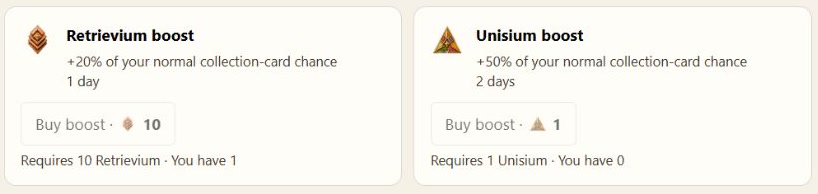
In the options shown, 10 Retrievium adds 20% of your normal eligible discovery chance for one day, while 1 Unisium adds 50% for two days. These are relative increases to the usual chance, not guaranteed discoveries.
Resources come from completed study-card activities, mainly according to the active study time recorded for each card. Each learning process earns its own resource. Inspect your balances and available actions in Collection & Resources.
Resource names, crafting, and collection boosts
The four ordinary resources are Encodium for connecting, Retrievium for retrieving, Explainium for explaining, and Solvium for solving. You can craft the combined resource, Unisium, from ten of each. The app shows the recipe and your available balance before crafting.
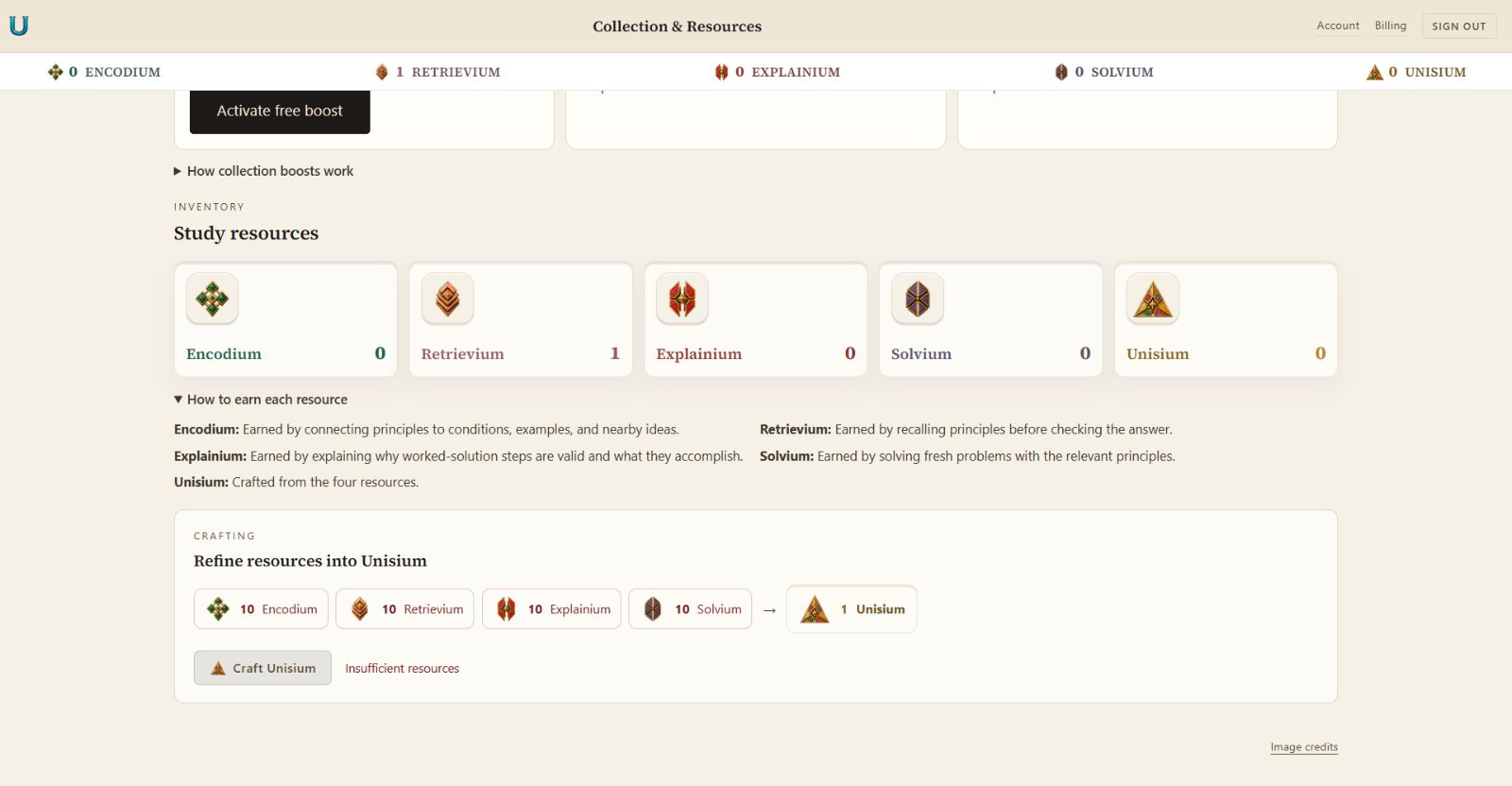
Earned Retrievium and Unisium can be spent on time-limited collection boosts. A boost raises the chance of finding a card during eligible study; it does not replace eligibility requirements, guarantee a discovery, or raise your learning score. The app displays the cost, duration, and effect before you choose to spend anything.
A Study System You Can Use in Different Ways
You can type, dictate through an external tool, enter equations in LaTeX, sketch, or work on paper and submit the final answer, depending on the activity. Choose the input that lets you express your thinking clearly. Dictation can make an explanation easier to enter, but the reasoning still needs to come from you.
For retrieval, scratchpad sketches are self-reported practice and do not qualify for collection-card drops. AI equation scoring makes a scored retrieval attempt eligible where the collection rules apply. In self-explanation, the sketch supports your thinking; AI evaluates the submitted written explanation, not the drawing itself.
You can study on desktop or mobile, and you do not need a fixed-length session. Study setup controls your subject scope and active learning modes; Focus narrows the work within that scope. If a mode you want is not appearing, check both its setting and your current focus.
Unisium also provides free principle and subdomain guides, available to everyone rather than behind the study subscription. The guide library explains the covered principles, their conditions and representations, and their place in the subject. Read the relevant explanation when you need it, then return to practicing the idea.
For the covered topics, the guides, questions, worked solutions, practice, and feedback form a study system in one place. You do not have to compile a separate textbook-and-flashcard workflow to use it. Check subject availability and subscription details against what you want to learn, especially if your course extends beyond the current material.
FAQ
Where should I start if I do not know my level?
Choose the subject you want to study and begin with the guided introduction. Normal practice builds evidence from your attempts and adjusts subsequent work. You do not need to know your level in advance, but there is not currently a course-wide placement test that assesses every topic before you start.
What if I cannot answer a question about why something works?
Make the best explanation you can, then use the feedback and the linked principle guide to identify what you are missing. The purpose is to develop the connection, not to prove that you already understand it perfectly. A concrete example can help, but also explain why it illustrates the principle.
What if feedback seems wrong?
Use Give feedback to report it. Reporting a problem is free. You can also submit a different EE or SE evaluation; the app shows the one-Unisium resource cost before you do so. Reporting incorrect feedback and overriding an evaluation are separate actions.
Why do I not see problem-solving cards?
Check that problem solving is enabled in Study setup and that your Focus includes suitable material. The next card also depends on due work, progression, and available content. A short session does not necessarily include all four learning modes.
How long is a study session?
As long as you choose. Normal study sessions have no fixed number of cards to finish. Complete as many as you like, then select End Session whenever you’re ready to stop, even partway through a card.
Your completed cards remain saved and appear in the session summary. The unfinished card is not counted as a completed attempt.
Do I need Wispr Flow or a phone to use the app?
No. Wispr Flow is the external dictation tool used in the recordings, and ordinary typing is supported. You can study in a desktop browser or use the mobile-friendly interface on your phone; the portrait clips above were adapted from desktop sessions.
Can I use sketches without AI scoring?
Yes. Scratchpad retrieval lets you check and self-report your recall, but it does not qualify for collection-card drops. In self-explanation, a sketch can support your thinking, while the written explanation is what AI evaluates.
Are collection-card levels the same as learning levels?
No. Your learning levels describe progress across the four processes for each principle. Collection-card levels describe reward variants you can become eligible to discover through study; the two systems are connected, but finding a card does not replace practicing the principle.
How This Fits in Unisium
Unisium brings the material, four learning processes, feedback, adaptive review, and progress record into one study routine. If that is how you want to build math and physics understanding and independent skill, See plans and availability. For more about the underlying learning design, explore Masterful Learning; for a closer fit check, read Is Unisium Right for You?.
Ready to apply this strategy?
Unisium turns these evidence-based techniques into guided study sessions for math and physics. Places are limited during early access. Check current availability to start a trial; joining the mailing list is optional.
See plans and availability Read More GuidesAlready have access? Sign in